Yesterday, my coding agent implemented a feature. Today, I merged it.
The in-between was what I think of as the last 20%: responding to code review feedback, refactoring for clarity, cleaning up the slop the agent left behind. It’s the work that turns “it works on my machine” into “it’s ready for production.” The agent did most of that work too. But every time it changed something, it verified the feature still worked end-to-end.
Not by running the test suite. By running the manual test.
What is a manual test, really?
When I say “manual test,” I don’t mean “a human clicks buttons.” I mean a human-readable script: go to this page, enter this data, click this button, verify this result appears.
The “manual” describes the format, not the executor. It’s a script written for humans to follow. But agents can follow scripts too.
Playwright MCP gives the agent a browser
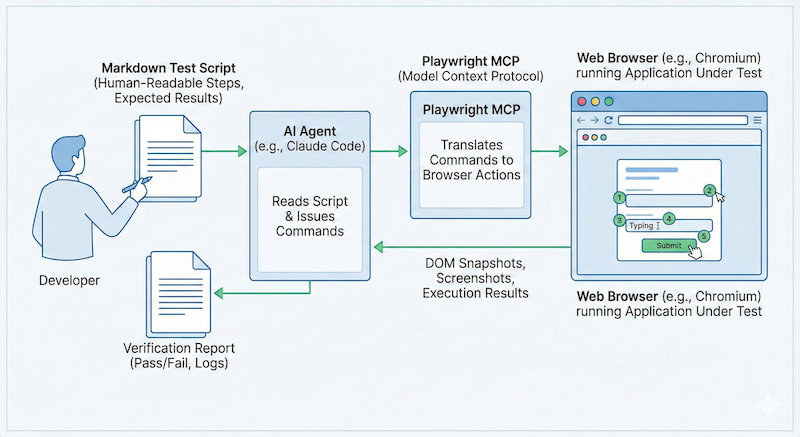
Playwright MCP is like giving your agent Selenium or Cypress, but through the Model Context Protocol. The agent can navigate pages, fill forms, click elements, take DOM snapshots, capture screenshots, and verify content appears as expected.
I created a slash command called /manual-test. Pass it a test name, and it looks up the corresponding markdown file in docs/manual-tests/, then executes it step by step using Playwright.
The same command can also create test scripts. Describe what you’re testing and what you expect, and it generates the markdown spec for you.
The slash command that ties it together
Here’s the /manual-test command I use in Claude Code:
| |
The command handles both modes. Pass a test name that exists, it runs the test. Pass a name that doesn’t exist, it asks you questions and generates the spec. The dynamic context (available tests, app URL) gets injected at runtime so the agent knows what it’s working with.
The test script is just markdown
Here’s an abbreviated version of my ChatKit weather agent test:
| |
Prerequisites, steps, expected results, checklist. Human-readable. Agent-executable.
Self-healing during polish
Here’s where it got interesting.
A code review comment asked me to move some logic from one place to another. Standard refactoring. The agent made the change and updated the test suite to match. All tests passed.
But the manual test failed. The weather widgets weren’t rendering anymore.
Because the agent was the one running the verification, it immediately recognized the issue. It had just moved that code. It knew exactly what broke and why. It fixed the problem and re-ran the test. Green.
This is the loop I want: agent makes change, agent verifies change, agent fixes what it broke. I’m not the only one who knows if the feature works.
If you’ve written Cucumber specs, this will feel familiar
The structure is basically Cucumber with Selenium. Given/when/then, but in plain markdown instead of Gherkin. If you haven’t used Cucumber, think of any end-to-end test framework where you script browser interactions.
The difference is cost. Cucumber specs were expensive to write. You needed step definitions, page objects, careful CSS selectors. And they were brittle to run. A renamed class, a shifted layout, a slow network request, and your suite is red for reasons that have nothing to do with your code.
These markdown specs are cheap to write. You describe what a human would do, and the agent figures out how to do it. No step definitions. No page objects. The agent reads the page, finds the element, clicks it.
They’re also more forgiving. If the button text changes from “Submit” to “Send,” a human following the script would adapt. So does the agent.
Practical caveats
Playwright MCP is token-heavy. Every snapshot, every page state, adds to your context. Two suggestions:
Use a cheaper model for verification. Running a manual test doesn’t require deep reasoning. It’s following a script. Sonnet or Haiku (Anthropic’s faster, cheaper models) will do the job at a fraction of the cost.
Run verification in a separate context. Don’t bloat your main task’s context with Playwright output. Spawn a subagent or use a dedicated session for test runs. Your implementation context stays clean; your verification context can be disposable. I discussed this trade-off in Setting Agents Up to Succeed.
Get the manual testing script firmed up early
Here’s the tip: once you’re happy with your end-to-end result, write the manual test script as soon as possible.
Before you have it, you’re the only oracle. You’re the only one who can verify the feature actually works. Every code review change, every refactor, you’re back in the browser clicking through flows.
After you have it, the agent can self-verify. You can hand off the tedious work and trust that the agent will catch regressions.
The test suite tells you if the code runs. The manual test tells you if the feature works.
The investment is a few markdown files. The payoff is an agent that catches its own regressions before you have to.