I wanted MCP auth to feel invisible.
The dream was simple. User opens the app, starts chatting with the LLM. At some point they ask for something that needs an external tool. “What’s on my calendar this week?” The LLM realizes it needs Google Calendar access, prompts the user for permission right there, they approve, and the tool runs. Contextual. Just-in-time. No setup screens.
This is how permissions should work. Ask for what you need, when you need it, and not a moment before.
Except MCP doesn’t work that way.
The oauth wall
Remote MCP servers expect authentication during the connect phase. Before the conversation starts. Before you know what tools you’ll need.
The client needs to know what tools are available so it can tell the LLM what’s possible. The LLM can’t decide to use a tool it doesn’t know exists. But fetching the tool list requires authentication. The server doesn’t expose its capabilities to anonymous requests.
By the time the user says their first word, they’ve already granted permissions.
The loop
I tried to defer it. Build the auth flow to trigger lazily, on demand, when the user actually needed a specific tool.
Then I hit the loop.
You can’t know which tools to offer the LLM without being authenticated to the MCP server. You can’t authenticate contextually without knowing which tools are relevant. And you can’t know what’s relevant until the user asks for something that requires a tool you haven’t loaded yet.
Chicken and egg, baked into the protocol.
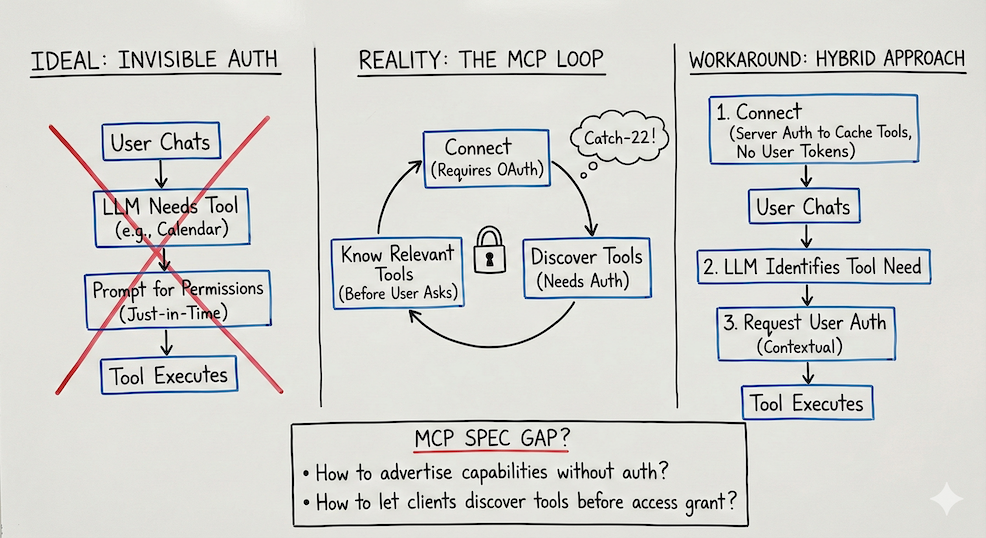
The pattern everyone’s landing on: authenticate everything upfront, then let users toggle which tools are active. Claude Desktop does this. You connect your MCP servers, grant permissions during setup, then selectively enable tools per conversation.
It works. But it forces the user to understand what tools exist and decide what they might need before they’ve even started talking. Configuration before value. The old paradigm wearing new clothes.
The workaround
The fix I landed on separates two concerns: discovering what tools exist versus authorizing a specific user to use them.
At connect time, I authenticate once just to cache the available tools and resources. No user tokens stored. Just answering the question: what can this MCP server do?
Now the LLM knows what’s possible. It can see the full menu.
During the conversation, when the LLM decides it needs a specific tool, that’s when I request user auth. “To check your calendar, I need access to Google Calendar. Want to connect it?” The user approves, the oauth flow runs, the tool executes.
The user still sees a permission prompt. But it happens in context, at the moment of need, for the specific tool that’s relevant. Not upfront for everything that might theoretically be useful someday.
The gap
This works for me. But it’s a workaround, not a solution.
The MCP spec doesn’t have a pattern for unauthenticated capability discovery. No standard way for a server to say “here’s what I can do” while still requiring user-specific tokens to actually do it.
How do you advertise capabilities without requiring auth? How do you let clients discover tools before users grant access? How do you separate “what’s possible” from “what’s permitted”?
Right now, every client that wants just-in-time auth has to invent their own answer. That’s a gap in the spec.