TL;DR: MCP servers can return embedded ui:// resources with ChatKit widget payloads. Your Rails controller extracts these from tool result metadata and streams them as thread.item.done events. The widget JSON is hydrated server-side before hitting the browser.
If you’re trying to get OpenAI’s ChatKit UI working with MCP tools in a Ruby on Rails backend, including streaming rich widgets like weather cards over SSE, this post walks through the full architecture and example code.
Quick Background
ChatKit is OpenAI’s UI SDK for building chat interfaces: threads, streaming, file uploads, widgets. Check out the Widget Gallery to see what’s possible.
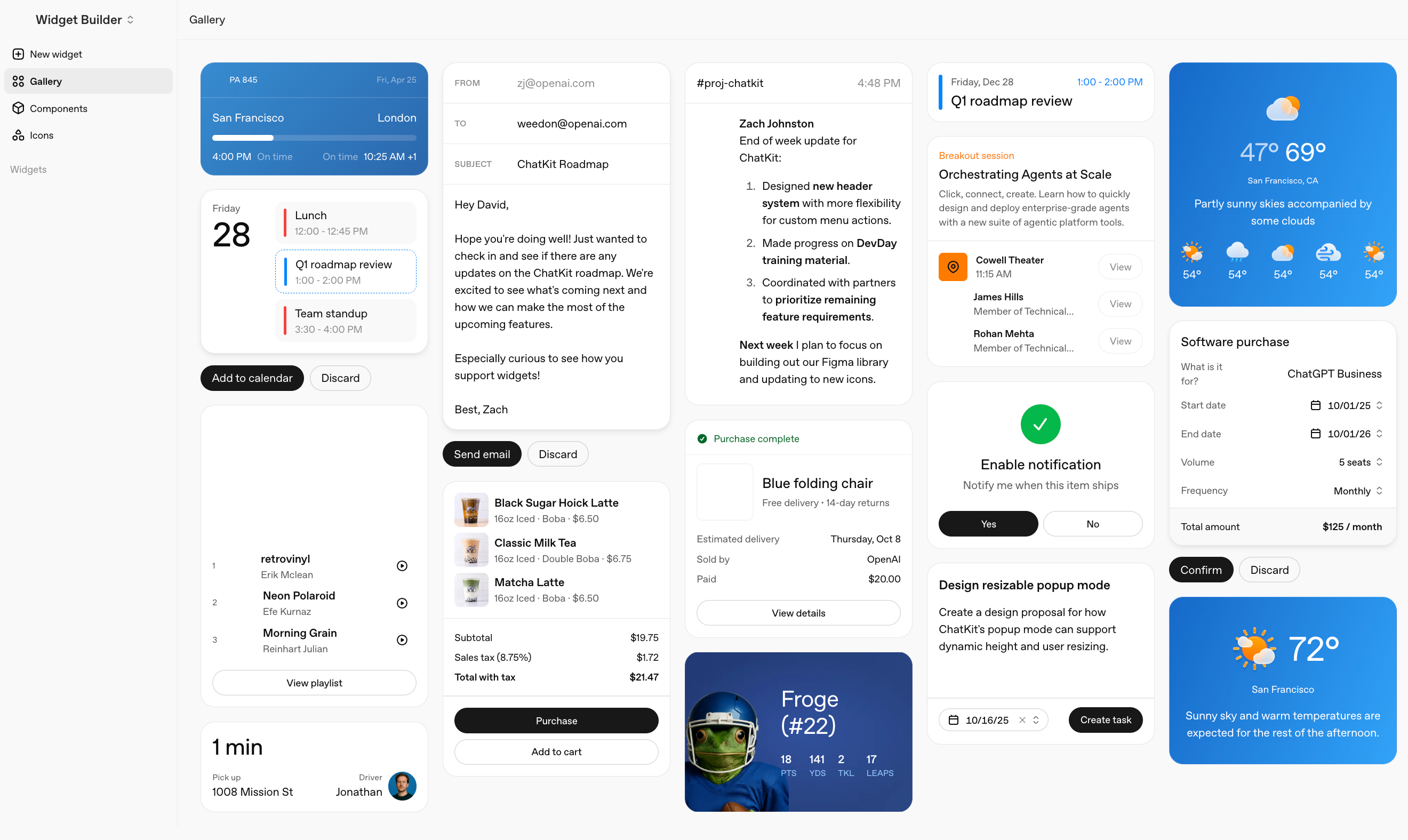
MCP (Model Context Protocol) lets tools and backends communicate with LLMs in a consistent way, including returning rich content like UI payloads.
In this setup: ChatKit runs in the browser, Rails is the backend, and MCP servers provide tool results (like weather data) plus optional widget JSON.
This is part of what I’ve been exploring around AI-native app design: how control transfers between user and agent, and how the interface adapts to where you are in that flow. Widgets are one piece of that puzzle. When an agent fetches data, the user should see rich UI, not a wall of text.
What You’ll Learn
By the end, you’ll know how to:
- Connect OpenAI ChatKit to a Rails backend via SSE streaming
- Return MCP tool results with embedded
ui://widget resources - Extract and hydrate widget JSON in a Rails controller
- Stream
thread.item.doneevents so ChatKit renders rich widgets instead of plain text
Prerequisites
- Ruby on Rails 7+
- ChatKit JS, I used the CDN.
- At least one MCP server that can return tool results
- Basic familiarity with SSE in Rails (ActionController::Live)
The Problem
User asks “What’s the weather in Toronto?” I want them to see a formatted card with temperature, conditions, and an icon. Not just: “Current weather in Toronto: 5°C, Cloudy”
The pieces exist, but they don’t naturally connect yet. ChatKit renders widgets (Card, Text, Markdown components). MCP servers return rich content via embedded resources. LLMs call tools and pass results back.
The gap: MCP returns ui:// URIs with specific MIME types. ChatKit expects a particular JSON structure streamed via SSE. My Rails controller translates between them.
Architecture: Server-Side vs Client-Side Hydration
Here’s the end-to-end flow when a user asks about the weather:
- User sends message via ChatKit in the browser
- ChatKit POSTs to Rails controller, opens SSE connection
- Rails creates the user message, streams acknowledgment
- Rails calls the LLM, which returns a
tool_callfor weather - Rails invokes the MCP weather server
- MCP server returns text + embedded
ui://widget resource - Rails stores the tool result in message metadata
- LLM returns final response
- Rails extracts the widget from metadata, transforms to ChatKit format
- Rails streams
thread.item.donewith the widget JSON - ChatKit renders the Card component in the browser
The key decision: widget hydration happens server-side. Tools return widget structures, Rails assembles the JSON, SSE delivers it. This matches ChatKit’s Python SDK approach. The difference is extracting from MCP’s embedded resource format rather than using stream_widget.
Why server-side? OpenAI’s Apps SDK takes a different approach: the client (ChatGPT) handles fetching and caching resources. The MCP server returns URIs, and the client renders.
The tradeoffs:
| Server-side (ChatKit) | Client-side (Apps SDK) | |
|---|---|---|
| Control | Full control over rendering | Less control, client decides |
| Payload | Fully hydrated JSON | Just URIs, lighter payloads |
| Caching | Server responsibility | Client handles caching |
| Integration | Works with any client | ChatGPT-specific |
| Flexibility | Use any LLM provider | OpenAI ecosystem |
For a Rails app where I want the same widgets to render in a web UI I control, server-side hydration makes sense. If I were building primarily for ChatGPT, the Apps SDK approach might be cleaner.
With the architecture defined, let’s look at how each part maps to concrete Rails and MCP code.
Implementation in Rails
MCP Server: Returning Widget Resources
MCP tool results can include embedded resources with arbitrary MIME types. I bundle widget payloads alongside plain text so tools stay usable both for LLM context and for non-widget clients:
| |
This returns MCP-compliant content:
| |
Conventions:
ui://URI scheme identifies UI resourcesapplication/vnd.ui.widget+jsonMIME type tells the controller this is a ChatKit widget- Plain text comes first so non-widget clients and LLM context still work
Rails Controller: Extracting Widgets
ChatKit uses a single POST endpoint. The interesting part is detecting widget resources in tool results and transforming them:
| |
This extraction is generic: any MCP server that returns resources with the right URI prefix and MIME type automatically gets its widgets rendered. A calendar tool, a task manager, a stock ticker: same pattern, different widget templates.
SSE Streaming
When streaming responses, tool results with widgets become thread.item.done events. This is simplified for clarity; production code should handle timeouts and connection errors:
| |
Widget Templating
For multiple widget types, I separate structure from data:
Templates live in config/ui_widget_templates/*.widget:
| |
The service handles hydration with {{ variable }} substitution.
For simpler cases, BaseMCPServer includes helpers:
| |
Troubleshooting
Multiple Tool Calls Cause Infinite Loops
LLMs often return multiple tool calls in parallel. If you only process the first one, the LLM keeps retrying and you get infinite loops:
| |
Widgets Not Rendering?
Check these common issues:
- Wrong MIME type: Must be exactly
application/vnd.ui.widget+json - Missing URI prefix: The
urifield must start withui:// - Malformed JSON: Use
JSON.parsewith rescue to handle parse errors gracefully - Widget not in
mcp_content: Verify the tool result is stored inmessage.metadata["mcp_content"]
Why Self-Host?
OpenAI offers hosted ChatKit via Agent Builder. I went self-hosted because:
- Different LLM providers (Anthropic, Gemini, not just OpenAI)
- Existing Rails models and authentication
- Full control over conversation data
- Flexible MCP tool integration
The cost: implementing the protocol yourself. The Python SDK handles thread persistence, SSE streaming, and widget rendering. In Rails, you build from the protocol docs.
Summary
The code is mostly plumbing. The real work is understanding the formats each layer expects and drawing clean boundaries between them.
If you’re building this:
- Get basic ChatKit messaging working first
- Add tool calling, return plain text results
- Once that works, add widget resources to tool results
- Build extraction logic in your controller
Don’t write it all by hand. Describe the architecture, write specs, let AI agents implement. That’s how this got built.
Next Steps
- Add more widget templates (calendar events, task lists, search results)
- Experiment with interactive widgets (buttons that trigger server actions)
- Try different LLM providers behind the same ChatKit frontend
FAQ
Can I use this approach with non-OpenAI LLMs?
Yes. The key is that your Rails backend speaks the ChatKit protocol and your MCP servers return widget resources. The LLM provider itself can be OpenAI, Anthropic, Gemini, or any other.
Do I have to use MCP to get widgets in ChatKit?
No. You can generate widget JSON directly in Rails. MCP just gives you a consistent way to structure tool results across services.
Is SSE required or can I use WebSockets?
ChatKit expects SSE-style streaming. You could adapt these ideas for WebSockets, but the example here is built around SSE.
Further Reading
- ChatKit Documentation
- ChatKit Widget Gallery
- MCP Specification
- OpenAI Apps SDK (client-side alternative)
- What Makes an App AI-Native? (my earlier post on control transfer)